Vulnerability Remediation for Cloud Compliance: Insights on the Processes and Tools That Work

AWS Cost Management for SMBs: Here's What Nobody Tells You
You've seen the headlines. "Three easy ways to cut your cloud bill." "High-impact, low-effort cost savings." “Quick wins.” "Start optimizing in minutes."
If your company runs on AWS, relies on AWS-native tools, and you've tried to act on any of that advice, you know the truth: managing cloud costs is definitely not easy, it's rarely straightforward, and "low effort" is doing a lot of heavy lifting in those claims.
This isn't a knock on the idea of cost optimization. It's a widespread and expensive problem worth solving. According to Flexera's State of the Cloud report, managing cloud spend is a top challenge for over 80% of organizations, from enterprise to SMB. Gartner estimates that companies waste as much as 35% of their cloud spend. The numbers are big, and so is the gap between “knowing you should optimize” and actually doing it.
And yet the advice consistently undersells how hard the cost optimization work actually is, especially if the same person managing your AWS environment is also on-call and shipping features.
Here's what the "it's easy" crowd isn't telling you about AWS cost management.
Your data is all over the place.
Before you can optimize anything, you need to understand where your money is going. Simple enough, right?
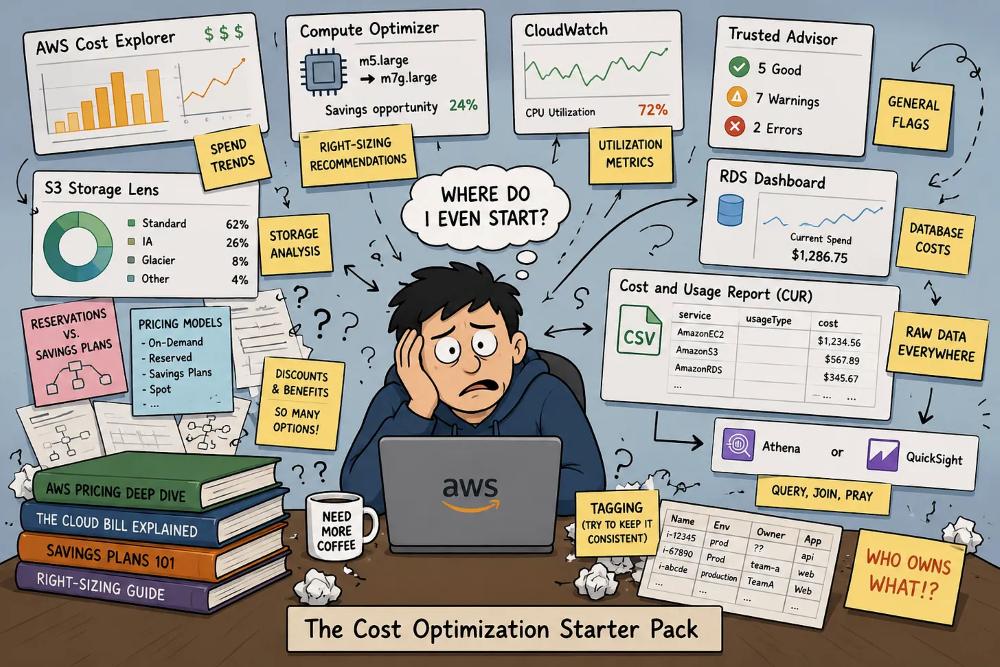
Not quite. A complete picture of your AWS costs requires pulling data from at least half a dozen different places:
- Cost Explorer for spend trends
- Compute Optimizer for instance recommendations
- CloudWatch for utilization metrics
- Trusted Advisor for general flags
- S3 Storage Lens for storage analysis
- the RDS console for database costs
And that's before you factor in Cost and Usage Reports (CUR), which require a separate setup with Athena or a BI tool just to query them. Not to mention you have to understand the intricacies of the pricing models for all the different services along with the different cost optimization strategies (Reservations, Savings Plans, right-sizing, etc).
None of these are integrated into a single, actionable view. Getting a true read on what you're spending, where you're wasting, and what to do about it means jumping between consoles, manually correlating data, and knowing which tool covers which service.
For an enterprise with a dedicated FinOps team, that's a workflow (and, hint: they’re using an expensive tool or building/maintaining their own internal tool). For SMBs, it's a part-time job that nobody was hired to do.
Right-sizing sounds simple, but it's not.
Right-sizing, aka matching your instance types to your actual workload needs, is consistently cited as one of the fastest ways to reduce compute costs. And in theory, it is. In practice, here's what it actually involves:
- AWS Compute Optimizer needs at minimum two weeks of CloudWatch metrics history to generate meaningful recommendations, often closer to 30 days. If your monitoring isn't already configured correctly, the recommendations you get are low-confidence noise. And even when you do get solid recommendations, the tool gives you a list (not a plan).
- Someone still has to
- evaluate each suggestion
- understand the performance implications
- coordinate a change window
- understand whether or not the resource is already covered by either a reservation or a savings plan
- execute the resize without breaking anything.
That's a significant engineering task, and far from simple. At a fast-moving, lean company, it's competing with sprints, customer escalations, and the twelve other things on the infrastructure team's plate.
Then there's the instance family challenge. Choosing between M-series, C-series, T-series, and Graviton instances requires understanding your workload's CPU and memory profile at a level most teams don't have documented. Moving to the wrong family saves money on paper and creates performance headaches in production.
Tagging is a prerequisite nobody talks about.
A significant chunk of cloud cost optimization depends on resource tagging, where you attribute spend to teams, applications, or environments. Scheduling non-production instances to shut down overnight (a genuinely high-value practice) requires knowing which instances are non-production, which can be stopped, and during what periods of time. Chargeback reporting requires consistent cost allocation tags. Identifying zombie resources requires tags that tell you who owns what as well as a baseline definition of a zombie instance.
Here's the reality: most SMB environments have inconsistent tagging at best and none at worst. It's a byproduct of moving fast. Teams spin up resources, workloads evolve, people leave, and the tagging governance that made sense on day one deteriorates quietly in the background.
Getting tagging right before you can optimize is its own project. It's invisible in most cost optimization guides, but it's often the first wall you hit.
(We understand this reality, however, and can absolutely help you cut costs without tags.)
Zombie resources are costing you money right now.
Closely related to the tagging problem is a category of waste that's endemic in AWS environments that have grown organically over two or three years: resources that are still running and still billing long after they stopped serving a purpose.
The usual suspects:
- Unattached EBS volumes that persist after an EC2 instance is terminated
- Snapshots that accumulate indefinitely without a lifecycle policy
- Load balancers sitting in front of nothing
- Temporary test instances that were never terminated
- Elastic IPs that are allocated but unassociated
None of these show up as obvious line items in your bill. None trigger alerts. They just exist, quietly, accumulating charges that blend into the background noise of a growing AWS spend.
The problem compounds over time. A company that's been on AWS for years, spinning up environments for new features, onboarding and offboarding engineers, running tests that never got cleaned up, often has dozens of orphaned resources scattered across accounts and regions with no clear owner.
And here's the thing most cost guides leave out: an untagged, unmonitored instance with no owner is also an attack surface. Waste and security exposure tend to travel together. The same discipline that eliminates cost often addresses the security risk.
Egress costs: the line item nobody warned you about.
Even teams that have a reasonable handle on compute and storage costs are often blindsided by data transfer charges. AWS bills for data moving between Availability Zones (AZ’s), between regions, and out to the internet, and these charges don't surface obviously in Cost Explorer without deliberate investigation.
It is hard to see egress costs in your AWS bill because many of the data transfer charges are shown as a sub-charge of a specific service like "USW2-DataTransfer-Regional-Bytes" or something similar, as opposed to a single "data transfer" charge.
Common scenarios:
- A data pipeline that crosses AZ boundaries on every execution
- A multi-region setup where replication was never reviewed after initial architecture
- An application serving content directly from S3 instead of through a CDN
Each of these can generate hundreds to thousands of dollars a month in charges that look like noise (until they don't). Unlike compute or storage, egress costs are architectural — you can't fix them by clicking a recommendation. You have to understand what's moving, where it's going, and whether the infrastructure was designed with transfer costs in mind.
Without a dedicated architect reviewing these patterns, egress is often the last cost category to get attention and one of the hardest to diagnose from native tooling alone.
Savings Plans and Reserved Instances require forecasting you may not be able to do.
Committing to a 1- or 3-year savings plan can deliver significant discounts: up to 72% compared to on-demand pricing. But that commitment requires confidence in your future usage patterns. Overcommit and you're paying for capacity you don't use. Undercommit and you leave savings on the table. Not to mention there are multiple types and options (all upfront, partial upfront, no upfront, convertible, etc.) to take into account when deciding what reservation to purchase. Additionally, overlap between any reservations and savings plans would result in actually paying more for the resources.
For a growing company, predicting what your AWS footprint looks like 12 months from now is genuinely difficult. You might be planning a new product line, expecting customer growth, or considering a re-architecture. Cost Explorer's built-in savings plan recommendations are based on trailing usage, which is a reasonable proxy for stable, mature infrastructure, but a poor one for anything in flux.
This isn't a reason to avoid commitments entirely, but it is a reason why "just buy a savings plan" advice, delivered without context, can backfire.
There is a serious AWS tooling gap.
AWS's native cost management tools are built to show you data. They're not built to tell you what to do with it, prioritize actions by ROI, or surface the most impactful changes first in plain language. That gap between having data and knowing what actions to take is where most SMBs get stuck.
It's worth naming one specific frustration here: the most useful Trusted Advisor checks, i.e. the ones that flag underutilized EC2 instances, idle load balancers, and unassociated Elastic IPs, are available only with AWS Business or Enterprise Support tiers. It's a structural barrier that rarely gets mentioned in the "easy wins" conversation.
Business Support starts at $100/month or 10% of monthly AWS usage, whichever is greater. For a company spending $5K/month on AWS, that's an additional $500/month just to access the recommendations designed to help you save money.
Enterprise teams bridge the broader tooling gap with dedicated FinOps practitioners, deeply integrated third-party platforms, and ongoing AWS Partner engagements. SMBs typically have none of those. What they have is a stretched engineering team and a billing dashboard that requires comprehensive AWS expertise to interpret.
This is why the "cloud cost optimization is easy" framing frustrates practitioners who work in these environments every day. Yes, right-sizing, scheduling, smarter storage tiering, and better pricing commitments are all genuinely valuable advice. The gap is in how they're presented: as quick wins accessible to anyone, rather than as technical work that requires the right data, the right tooling, in-depth expertise, and dedicated time to execute.
To be fair, the vendor ecosystem has caught up... somewhat. There's now an entire category of cloud cost optimization tools designed to close exactly this gap:
Unifying data across AWS services
Prioritizing opportunities
Making action accessible to teams that don't have the bandwidth for manual analysis
The catch is that not all of them deliver on that promise. Or they're priced for large enterprises.
So what does successful AWS cost management look like for an SMB?
It starts with asking the right question. Most teams look at their AWS bill as an absolute number; when it goes up, they react. A more useful question is: what is our cost per customer, per transaction, or per deployment? ‘Unit economics’ framing changes the nature of the problem. An AWS bill growing 15% month-over-month might reflect efficiency if revenue is growing faster, or if you’ve deployed additional workloads. A flat bill can hide terrible unit economics. Optimization that doesn't connect to business outcomes is just cost-cutting, and cost-cutting without context can hurt as much as it helps.
From a tooling standpoint, what good looks like is a consolidated view of:
- Where spend is going
- What's idle
- What's oversized
- Which commitments you have across all your accounts, not just the primary one.
A good tool (or consultation or report or third party) provides:
- Data-backed recommendations that are prioritized and scoped to your environment (not a raw list that requires a week of triage to interpret)
- Ability to take action (or full-service implementation) without a FinOps certification or an AWS Business Support plan upgrade.
That's the bar, which in reality is not unreasonable. But this is just not what you get from native tooling alone. The market is full of vendors promising cost savings, or pay-a-percentage-of-savings models, or requiring a 6-month integration with an accompanying hefty price tag. (Word of caution: cost-focused tools are either very niche, very pricey, lackluster (legacy), or, nowadays, vibecoded and don't actually integrate with AWS.)
💡 Kalos lets you view all your data and recommendations completely free, no obligations.
Try it out >>
Where to start
If you’re a lean team with limited resources, the best ways to start tackling cost optimization, in order of cost/effort, include:
- If you have an AWS Account Manager, reach out to ask for a free Well-Architectured Framework Review or cost review. Most partners offer this for free (and if they don’t, we do).
- Get a free cost optimization assessment from a third-party vendor.
For most teams, a SaaS vendor gives you faster time-to-value than native tooling alone. Many offer free trials and can give you a solid starting point. Tip: ask about data privacy and verify they only see infrastructure usage, no application data.
- Hire a consultant or specialist for project work. If they help with routine implementation and automation, you can see ROI in a few months. But understand that you’ll likely need that person/company a couple times a year minimum since cost optimization fluctuates with changing workloads.
- Train or hire a team member specialized in AWS infrastructure. This is a significant investment, but a path midsize and larger enterprises eventually go down to get someone who knows how the applications work and how to optimize them on AWS infrastructure. If you’re at this stage, you’ll likely also have a more sophisticated tool to assist this person/team in managing significant infrastructure.
- Combine all of the above. Ideally with the same vendor who is connected to AWS and includes support beyond a self-serve SaaS.
It’s a crawl-walk-run approach. There’s low-hanging fruit and then there’s infrastructure changes. Make cost optimization is ongoing and iterative, where you build up your investment in the effort as your application grows and changes.
See what you're actually spending and where you can save.
If you're running on AWS at an SMB and you've been meaning to get a handle on your cost management approach but haven't had the bandwidth to dig in, Kalos can show you exactly what's going on and where to save, without the manual work.
Generate your free AWS savings snapshot in minutes.
Get a clear picture of what you're spending, what you could save, and where to start.
Get my AWS savings snapshot >>
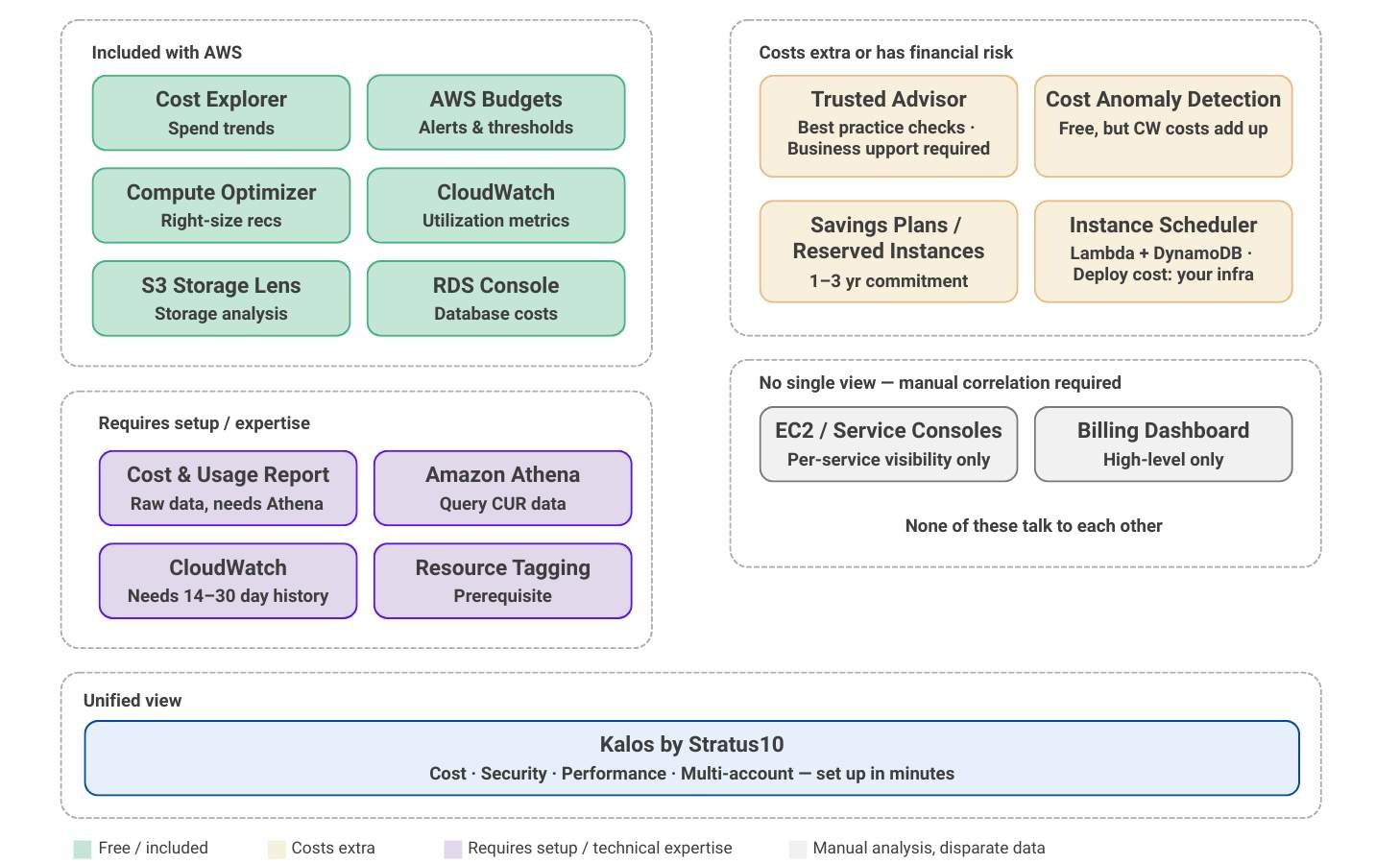
As an AWS Advanced Partner with numerous SMB clients, we built Kalos because other cloud cost and security tools just didn't cut it. We live and breathe AWS and understand what SMBs need to move the needle — and it's not managing more infrastructure.
FAQs
The advice is usually accurate in isolation, but it skips over the work it takes to actually act on it. A complete picture of your AWS spend requires pulling data from Cost Explorer, Compute Optimizer, CloudWatch, Trusted Advisor, S3 Storage Lens, the RDS console, and often Cost and Usage Reports through Athena. None of those views are integrated, so the engineer who is also on call and shipping features ends up correlating numbers manually. Real AWS cost management is steady technical work, not a quick win, and the gap between knowing you should optimize and actually doing it is where most teams get stuck.
Three categories show up over and over. Zombie resources, such as unattached EBS volumes, snapshots without a lifecycle policy, idle load balancers, and unassociated Elastic IPs, accumulate quietly and never trigger an obvious alert. Egress charges between availability zones, between regions, and out to the internet hide as service sub line items rather than a single transfer charge, so they are easy to miss until they are large. Underutilized non production instances that nobody scheduled to shut down overnight are also common, especially in environments where tagging is inconsistent.
AWS Compute Optimizer needs at least two weeks of CloudWatch metrics, and ideally closer to thirty days, before its recommendations are reliable. Even when the recommendations are solid, you still get a list rather than a plan. Someone has to evaluate each suggestion, understand the performance implications, coordinate a change window, check whether the resource is already covered by a Reservation or Savings Plan, and then execute the resize without breaking the workload. Picking between M, C, T, and Graviton instance families also requires a level of CPU and memory profiling that most teams do not have documented.
They can deliver real discounts, up to 72 percent compared to on demand pricing in some cases, but they require accurate forecasting that growing companies often cannot produce. Overcommitting means paying for capacity you never use, and undercommitting leaves money on the table. Cost Explorer recommends commitments based on trailing usage, which works well for stable mature infrastructure and works poorly for anything in flux. Overlapping a Savings Plan with existing Reservations can also push your effective cost up rather than down, so the purchase decision deserves more analysis than the headline numbers suggest.
It starts with framing the question around unit economics rather than the absolute bill, so a 15 percent month over month increase in spend is read against revenue growth or new workloads instead of treated as an automatic problem. From a tooling standpoint, the goal is a consolidated view of where spend is going, what is idle, what is oversized, and what commitments you have across every account. Recommendations need to be prioritized and scoped to your environment so they are actionable, not raw lists that take a week to triage. Kalos was built for exactly this scenario, which means a lean SMB team can see total spend, savings opportunities, and security posture in one place and act on them without a FinOps certification or a Business Support tier upgrade.
Get In Touch
Get a comprehensive AWS savings snapshot
Explore savings recommendations for your environment, including:
- 1-click scheduling for underutilized and zombie resources
- Ideal commitment breakdown of Savings Plans and Reservations
- Right-sizing suggestions, taking commitments into considerations
- Detailed data transfer costs
- Security risks impacting cost
Get started today by filling out the form.
Featured Articles
AI Cost Management: 12 Practices to Control Cloud Spend as AI Workloads Scale
AWS Instance Scheduler: What It Requires and Why Teams Look for Alternatives